
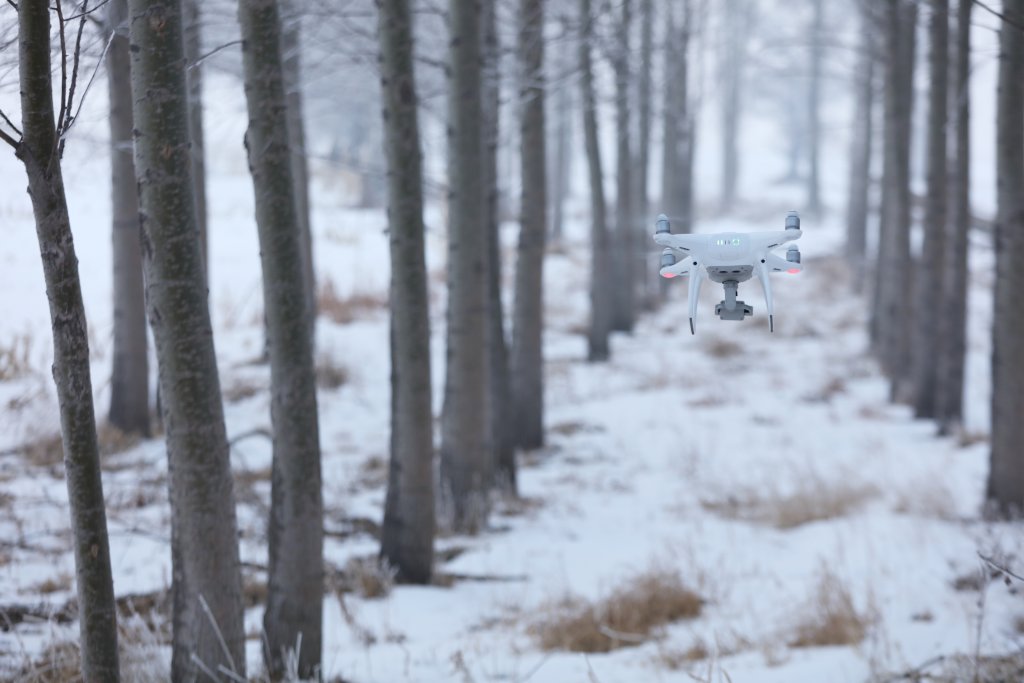
Flying a drone in winter can sometimes be challenging and dangerous due to the extreme conditions – wet weather creates icing on the propellers, low temperatures affect the performance of the helicopter’s battery and often freeze the pilot’s fingers, which increases response time in case of danger. Here are a few basic things to remember when flying in winter, to ensure that your drone flying experience will last until next Midsummer.

Aku
Have you noticed that in winter your phone sometimes turns itself off even if the battery is not yet discharged? Because drones use the same lithium polymer (LiPo) chemistry-based batteries, they have the same problem. LiPo batteries deliver less power in cold weather. Some batteries, such as the DJI Inspire 2, have a built-in heating process that diverts some of the battery’s power to maintain operating temperature. The new Mavic 2 Enterprise series batteries have a built-in self-warming process that starts automatically, while it can also be started manually. Follow the tips below to ensure safe flight:
- Use only fully charged batteries.
- If possible, preheat the battery to room temperature to keep them warmer in the air for longer.
- At lower temperatures, the battery may discharge faster than expected. Always keep an eye on the battery indicator and come back sooner rather than later.
- Don’t keep batteries outdoors in the cold. If the battery is not inside the helicopter at the time, try to keep it in a car or in the bladder, for example, to keep out the cold.
Environment
Low visibility and snow reduce visibility during flight. It is important to observe precautions:
- Check the weather conditions before you fly. Avoid strong wind, rain and snow.
- Be particularly careful when flying in temperatures below 0°C.
- Avoid contact with snow – moisture can damage electronics. It is recommended to use a landing pad for landing.
- At temperatures close to 0° C, there is a risk of icing on the propellers during flight. When flying close to 0° C, be sure to check the propellers after each landing and make intermediate landings if possible. If you find ice, clear it from the propellers, continue to make intermediate landings and fly only in the safest possible places where the helicopter will not damage any property if it falls. It’s a good idea to keep eye contact with the drone – if the drone starts to wobble in the air, it could be due to the propellers icing up, and the pilot may not notice it immediately through the screen, as the gimbal stabilises any wobble.
- A confounding factor can also be the so-called. snow blindness – especially when flying a white helicopter. The only small help against this is to have a darker drone, or to glue/paint over a lighter one. But in general, it is enough to be aware of the possibility of snow blindness and to be aware that you may find yourself in a situation where the drone can disappear for a moment in a white snow background..
Stay warm
As mentioned earlier, the battery of your smart device can also die because of the cold, and if you don’t pay attention to this, you could end up flying the drone without any telemetry or direct imaging. In such a situation, you have to hope that you can spot the drone from the air, know its direction, and have had enough practice to bring it home safely.
Usually, the so-called “drone” tends to be a little too close to the ground, and you can’t see it. The dying off tends to happen with Apple devices, where the metal casing is good at conducting heat away from the device, but it’s not an unknown problem with Androids either. It is advisable to find a case to protect the device from the cold wind, but this is often not enough relief. In very bitter cold, hand-warming pads can be used, available in shops for a few euros. If that doesn’t help against the freezing cold, you should practise flying from a car, for example, or buy a device that is a little more resistant to the cold.
The most important thing about flying a helicopter is not the smart device, of course, but the pilot’s fingers. Keep your hands warm, even with thin gloves, because the metal levers on the remote control will make your thumbs stiffen up from the cold quite quickly, and even at lower temperatures, the feeling will gradually start to fade.
Camera settings
To shoot winter sports in thick snow, you’ll probably need to adjust theshutter speed and whitebalance yourself. On snow-covered ground, it’s difficult for the camera to know what to automatically adjust the settings for, and you may end up with a darker image than you want because the camera tries to adjust the exposure for white snow. If this happens, it’s time to start experimenting with ISO,Aperture andShutter. As these same parameters can be changed when shooting with a conventional camera, there are a million tutorials and guides on the internet. Of course, if you want to get a quick and fast image, you can skip all that and just tweak the EV slider under the shutterin the menu until you get the result you want.
It’s also worth experimenting withWhite Balance– only important when shooting in JPEG format. If you want the snow to stay snow-white, rather than grey like a storm-cloudy sky, try moving the Custom slider under White Balance until the snow in the image starts to look like Christmas again.
Storage
Sometimes the winter frost and cloudy skies don’t make you think about flying at all, and the drone stays in storage until spring arrives. However, with the wrong storage conditions, a lot can happen to the remote control, the drone and its batteries. All of this can lead to repairs or even battery replacement. Here are a few tips for long-term storage:
- Charge and discharge the battery every three months to maintain battery health.
- When storing for long periods, charge the remote control and drone batteries to half charge (40%-60%) to allow them to self-regulate to the correct voltage. If you’ve bought your own charging dock, it has a storage mode(P4P only) that you can use if you plan to store the batteries for longer periods.
- Remove the propellers and attach the gimbal (hanger) guard to the gimbal to prevent major damage to the drone in the event of a fall from the top of the cabinet. Of course, it is wise to store the drone in the box that came with the purchase, for example, or to buy a case for the whole kit.
- It would be ideal to store the drone in a dry, non-magnetic place at a temperature of around 25°C (77°F).
- We also recommend that you switch on the drone and all the electronics that came with it (console, batteries, etc.) at least once every few months for a few moments. With older helicopters, there have been cases where the electronics just give up when standing for a long time. Newer products should have this problem eliminated, but it’s always better to be safe than sorry.
If you have any questions or would like more information about any of our recommendations, please feel free to contact us at info@droon.ee,+372 56823722 or visit our showroom at Villardi 22, Tallinn.